
Custom HubSpot Zoom Integration Using APIs – Case Study

In this case study, we showcase a custom HubSpot Zoom integration built using APIs. Unlike standard plugins, this solution enabled advanced automation, real-time contact syncing, and seamless webinar registration across various marketing tools.

Hubspot Development

The brief

Our client sought to streamline their webinar registration process by integrating HubSpot and Zoom with their WordPress website. The goal was to develop a WordPress plugin that would automatically create contacts in HubSpot and register users for Zoom webinars upon form submission. This automation aimed to enhance efficiency, improve lead management, and provide seamless webinar registrations.

Project Description

To meet the client’s needs, we developed and deployed a custom WordPress plugin that integrates seamlessly with HubSpot and Zoom. The plugin works as follows:

  1. Form Submission: When a user fills out and submits a form on the WordPress website, the plugin triggers API requests to HubSpot and Zoom.
  2. HubSpot Contact Creation: The form data is sent to HubSpot via its API, automatically creating a new contact or updating an existing one.
  3. Zoom Webinar Registration: Simultaneously, the plugin registers the user for the selected Zoom webinar using Zoom’s API.
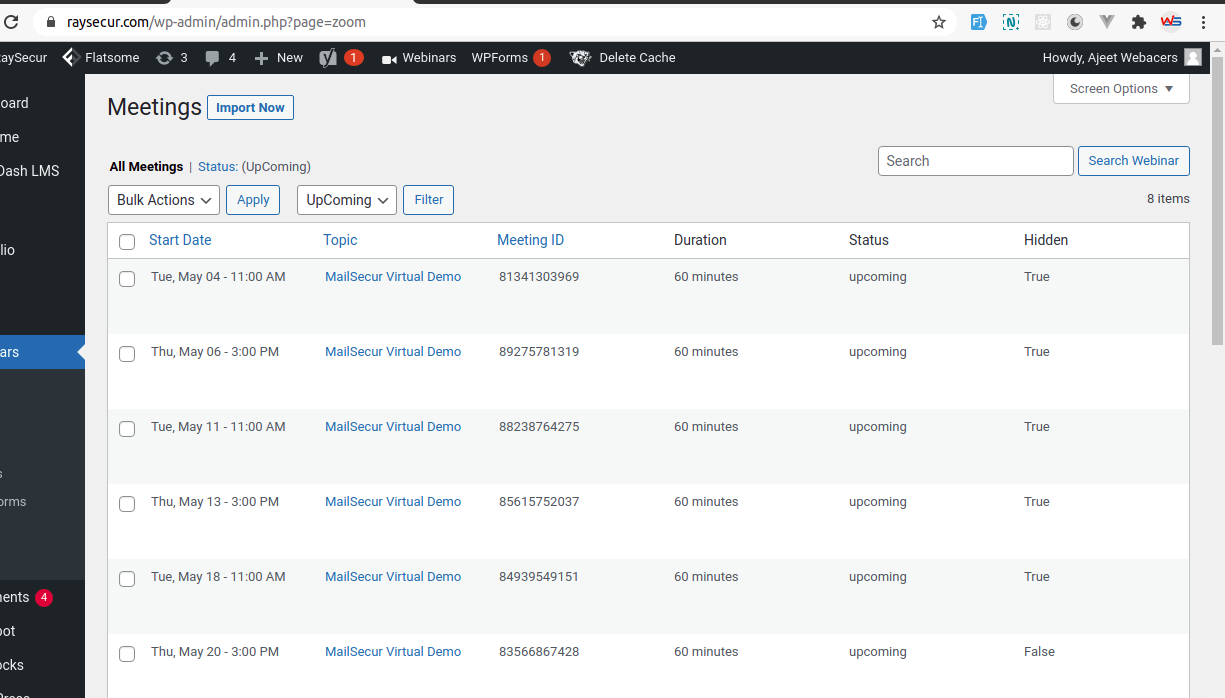
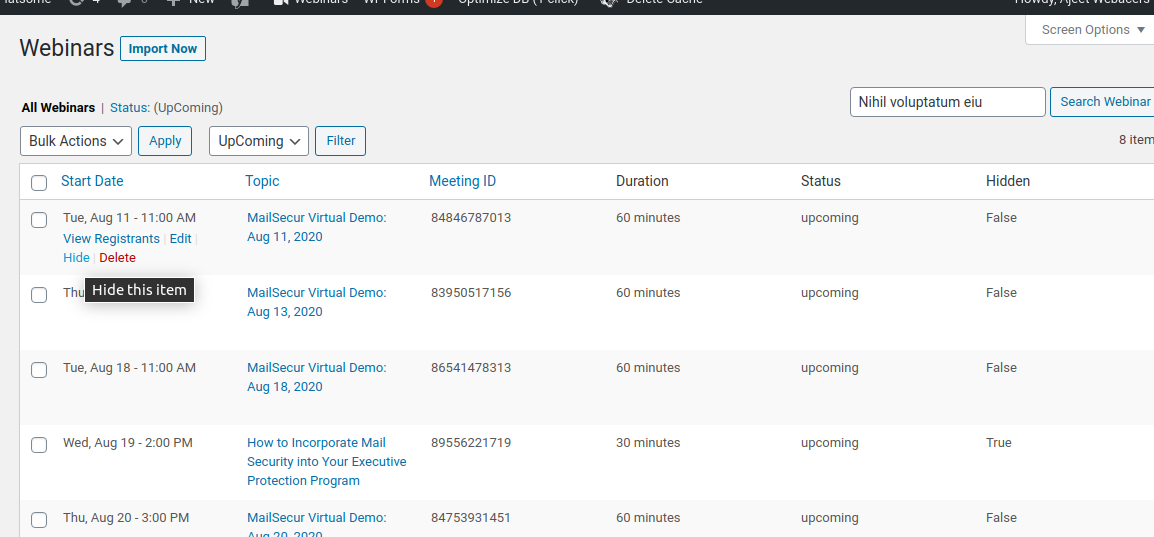
  4. Admin Panel: A dedicated WordPress admin section was developed to manage webinars, track registrants, and monitor integration status.

The plugin provides a user-friendly interface for administrators, allowing them to link webinars effortlessly, view registrants, and ensure smooth data synchronization between the platforms.

Technologies Used:

  • WordPress (PHP, JavaScript, MySQL)
  • HubSpot API
  • Zoom API
  • REST API Integration

Outcome & Benefits:

  • Automated Registration Process: Eliminated manual entry of registrant details, saving time and reducing errors.
  • Improved Lead Management: Automatic contact creation in HubSpot facilitated better tracking and follow-ups.
  • Seamless Webinar Experience: Users could register for webinars with a single form submission, improving engagement and reducing drop-offs.
  • Enhanced Admin Control: A centralized WordPress admin panel allowed easy webinar and registrant management.

FAQ

How does HubSpot integrate with Zoom in this WordPress solution?

We used Zoom webhooks and HubSpot APIs to automatically register users for webinars when they submit a form on the WordPress site. This integration works without any third-party plugins.

Do users need to log in to Zoom or HubSpot for the registration to work?

No, users simply fill out a HubSpot form on the website. Behind the scenes, our custom code connects HubSpot with Zoom and handles the registration automatically.

Can this HubSpot–Zoom integration handle multiple or recurring webinars automatically?

Yes, the system is designed to automatically detect and handle both new and recurring Zoom webinars. Once configured, it requires no manual updates to support future webinar events.

Is this integration compatible with Elementor or page builders?

This setup is fully independent of page builders like Elementor. The form is inserted using a shortcode, so it works on any WordPress theme or layout.

What happens after someone registers through the form?

Once the HubSpot form is submitted, the contact is created in HubSpot, and the user is automatically added to the Zoom webinar. A confirmation email from Zoom is also sent instantly.

Can I track webinar registrations in HubSpot CRM?

Absolutely. All webinar signups appear as contacts in HubSpot, making it easy to segment leads, create workflows, or follow up using marketing automation.
Automate Your Zoom Meetings & Webinars with HubSpot
One Smart Integration for All Your Client Interactions

Whether you host high-impact webinars or one-on-one meetings, WebAcer Software helps you streamline everything with custom HubSpot Zoom integration services. From auto-registrations to real-time CRM sync, we help you turn interactions into actionable insights.

If you’re managing webinars as part of your marketing campaigns, having a clear understanding of the digital marketing specialist role is crucial for assigning the right tasks

Design

Hubspot Zoom Meeting Integration
HubSpot & Zoom Webinar Integration for WordPress

Client Feedback

Excellent quality of work. Very prompt and responsive. Tested thoroughly and fixed errors quickly. Communication to educate client could be better, but overall I am very happy with the work!

--TJ Kelly, Team, Raysecur.com, United States

Creativity reimagined

More Case Studies

Expert Laravel Developer
Social Media & Advertising Design

Beauty & Wellness Booking Platform Development

Webacer Software was entrusted with developing an intuitive, high-performance platform that caters to both end users and beauty professionals. Challenges Complex Booking System: CitaLane needed a...
business card design in Australia

A2Z Worksheets Branding and Logo Design

The client required a cohesive branding package, including a logo, business card, and other branding materials, to establish a strong and professional brand identity....
Woocommerce Website Development
Custom Property Marketplace Portal Development in Australia

Custom Property Marketplace & Transaction Portal Development

The primary objective was to develop a user-friendly and scalable website with the following key features: Basic CRM Integration Member Accounts with two member types and...
Automate Your Zoom Meetings & Webinars with HubSpot
One Smart Integration for All Your Client Interactions

Whether you host high-impact webinars or one-on-one meetings, WebAcer Software helps you streamline everything with custom HubSpot Zoom integration services. From auto-registrations to real-time CRM sync, we help you turn interactions into actionable insights.

If you’re managing webinars as part of your marketing campaigns, having a clear understanding of the digital marketing specialist role is crucial for assigning the right tasks